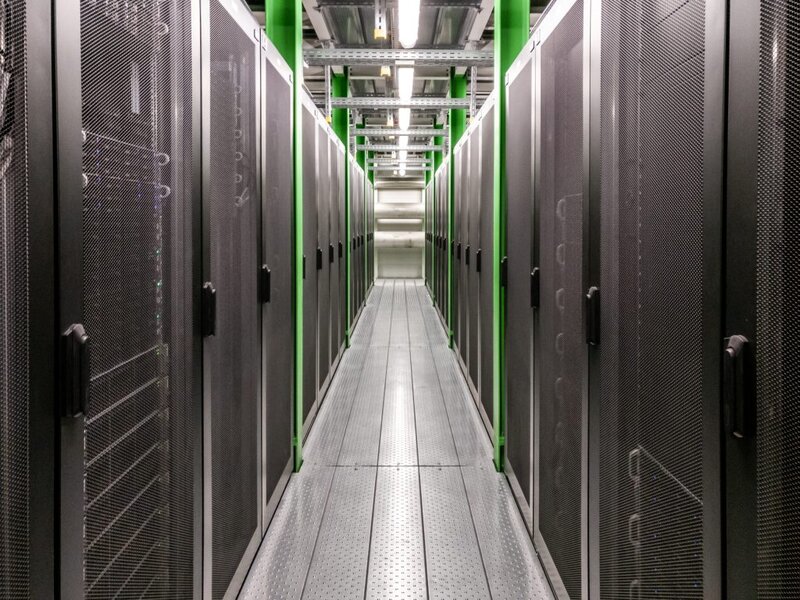
In today’s digital-first world, we often talk about “the cloud” as a magical, invisible force that powers our businesses. We rely on software, data, and online services more than ever. But here’s a critical question many Australian business owners overlook: what’s holding all that up? The answer is physical IT infrastructure, the tangible, hardworking backbone of your entire digital operation.
Ignoring this foundation is like building a skyscraper on sand. While software and cloud services are essential, they all rely on physical hardware to run. From the server in your back office to the network cables connecting your team, this infrastructure dictates your business’s speed, security, and reliability. This guide is for Aussie business owners who want to look under the bonnet of their IT. We’ll demystify what physical IT infrastructure is, explore why it’s still critically important in the age of the cloud, and outline how a robust foundation can become your greatest competitive advantage.
Demystifying “Physical IT Infrastructure”: The Core Components
So, what exactly are we talking about when we say “physical IT infrastructure”? It’s not as complex as it sounds. Think of it as the engine room of your business. It’s made up of several key physical components that work together to store, process, and move your data.
- Servers: These are the high-powered computers that run your business applications, host your website, and process data. Whether it’s a single tower server in a small office or multiple servers in a dedicated room, they are the processing core of your operation.
- Storage: This is where all your company’s valuable data lives, from financial records and customer information to internal documents. Storage systems can include hard disk drives (HDDs), faster solid-state drives (SSDs) within servers, or dedicated Network Attached Storage (NAS) devices.
- Networking Hardware: This includes the routers, switches, and physical cables (like Ethernet) that connect everything. This network is the central nervous system of your business, allowing your computers, servers, and other devices to communicate with each other and the internet.
- Server Racks & Enclosures: These are the specialised cabinets that house your servers, storage, and networking gear. A good server rack does more than just hold equipment; it provides organisation, security, and helps manage airflow to keep things cool. Investing in quality data rack solutions is a simple way to protect and organise your most critical assets.
- Power & Cooling: Perhaps the most overlooked yet vital components. An Uninterruptible Power Supply (UPS) is non-negotiable. It protects your expensive hardware from power surges and provides battery backup during an outage, preventing data loss and hardware damage. Likewise, servers generate significant heat, so dedicated cooling systems are essential to prevent overheating and ensure longevity.
At Powerfirm, we’ve seen firsthand how a small investment in the right power protection can save a business thousands in the long run. [Link to Powerfirm’s UPS and Power Solutions page]
Beyond the Cloud: Why On-Premise Infrastructure Still Matters
With the rise of cloud computing, many businesses wonder if they still need to worry about physical hardware. The answer is a resounding yes. While the cloud offers incredible flexibility, a hybrid approach that combines cloud services with a solid on-premise physical infrastructure often provides the best of both worlds. Here’s why your physical setup is still a cornerstone of modern business:
- Control and Security: When your data is stored on-site, you have complete control over it. This is particularly important for businesses that handle sensitive customer information or need to comply with Australia’s data sovereignty laws. Physical security is also in your hands; you can lock the server room door, something you can’t do with a public cloud provider.
- Performance and Speed: For tasks that require processing large files or demand ultra-low latency, like video editing, complex database queries, or CAD design, having the data and processing power on your local network is significantly faster than sending it back and forth to a remote data centre.
- Cost-Effectiveness for Stable Workloads: While the cloud is great for scalable, fluctuating demand, running stable, predictable applications on your hardware can be more cost-effective over the long term, avoiding ever-increasing monthly subscription fees.
- Reliability: Your on-site infrastructure isn’t affected by your internet provider’s outages. If your internet connection goes down, your team can still access local files and applications, ensuring business continuity for internal operations.
The Tangible Benefits: How a Solid Foundation Boosts Your Business
Investing in your physical IT infrastructure isn’t just an expense; it’s a strategic investment that pays dividends across your entire operation. A well-designed and managed foundation delivers tangible benefits that you’ll feel every day.
The most significant benefit is unparalleled reliability and uptime. With robust components like redundant power supplies and enterprise-grade servers, you drastically reduce the risk of unexpected downtime, which for many businesses can mean thousands of dollars in lost revenue per hour. This directly leads to improved business continuity, ensuring your team can keep working and your customers stay happy, even when external factors are unpredictable.
Next is enhanced security. A secure physical infrastructure is your first line of defence against cyber threats. By controlling who has physical access to your servers and networking gear and implementing hardware firewalls, you create a hardened target that is much more difficult to breach. This is fundamental to protecting not just your data, but your reputation.
Finally, a well-planned infrastructure provides performance and scalability. When your core systems are fast and responsive, your employees are more productive and less frustrated. Furthermore, planning for growth from the outset means your infrastructure can scale with your business. Adding more storage or processing power becomes a straightforward upgrade rather than a complete overhaul, making your IT infrastructure solutions for your business both agile and future-proof.
Designing Your Engine Room: Key Considerations for Your Server Room
Whether you have a dedicated server room or a small data closet, how you design this space has a massive impact on the performance and lifespan of your equipment. It’s not just about finding a spare corner; it’s about creating a stable environment for your most valuable assets.
- Location & Physical Security: Choose a secure, low-traffic area that is not prone to flooding or extreme temperatures. The room should be lockable, with access restricted to authorised personnel only.
- Cooling and Ventilation: As mentioned, heat is the enemy. Ensure there is adequate ventilation and, for rooms with multiple servers, a dedicated air conditioning unit. Proper rack layout can also promote front-to-back airflow, preventing hot spots.
- Power Redundancy: Every server and critical network device should be plugged into a high-quality UPS. For ultimate protection, consider redundant power supplies in your servers and dual UPS units. This is the core of UPS power protection.
- Cable Management: The “spaghetti junction” of cables behind a server rack isn’t just messy; it’s a hazard. Poor cabling can restrict airflow, lead to accidental disconnections, and make troubleshooting a nightmare. Use cable managers, zip ties, and colour-coded cables to keep things organised.
Properly outfitting your server space is a critical step. A quality, lockable enclosure protects against both environmental risks and unauthorised access. [Link to Powerfirm’s Server Racks and Enclosures page]
Conclusion: Build Your Business on a Rock-Solid Foundation
In an era dominated by software and services, it’s easy to forget the physical foundation that makes it all possible. Your physical IT infrastructure is more than just a collection of boxes and wires; it’s the engine of your productivity, the vault for your data, and the bedrock of your business’s resilience. Neglecting it is a silent risk that can lead to slowdowns, security breaches, and catastrophic downtime.
By understanding the core components, appreciating the role of on-premise hardware, and making strategic investments in areas like power, cooling, and security, you transform your IT from a potential liability into a powerful strategic asset. You gain control, enhance performance, and build a scalable platform that’s ready for whatever comes next.
Don’t leave your business’s backbone to chance. If you’re an Australian business owner looking to assess, upgrade, or secure your physical IT infrastructure, the expert team at Powerfirm is here to help. We provide the solutions and expertise you need to build a foundation you can rely on.
Ready to fortify your business? [Contact Powerfirm’s IT Infrastructure Services team today for a consultation.]
Frequently Asked Questions (FAQs)
- If my business uses a lot of cloud services, do I still need physical IT infrastructure? Yes. Even cloud-heavy businesses need a robust local network (routers, switches, WiFi) for reliable internet access. Furthermore, a hybrid model, where critical data or high-performance applications are kept on-premise, often offers the best mix of security, performance, and cost-effectiveness.
- What is the first step to improving my company’s physical IT infrastructure? An IT infrastructure audit is the best place to start. A professional assessment will identify your current setup’s strengths and weaknesses, focusing on key areas like power protection, security vulnerabilities, and potential performance bottlenecks. This gives you a clear roadmap for improvement.
- What are the key differences between physical infrastructure and cloud infrastructure? Physical infrastructure refers to tangible hardware you own and manage on-site (your servers, racks, etc.). Cloud infrastructure (IaaS) involves renting computing, storage, and networking resources from a provider like AWS or Azure. The key trade-off is typically control and long-term cost (physical) versus flexibility and upfront cost (cloud).
- How can I manage the costs associated with building and maintaining physical infrastructure? Start with a scalable design that allows you to pay as you grow. Invest in high-quality, energy-efficient equipment to reduce long-term operating costs. Most importantly, invest in robust power protection (UPS) to prevent costly damage and downtime from power events.
- What is “physical IT infrastructure management”? This involves the ongoing monitoring, maintenance, and administration of your hardware. It includes tasks like applying security patches to servers, monitoring for hardware failures, managing user access, ensuring backups are running, and planning for future capacity needs to keep the infrastructure running smoothly and securely.